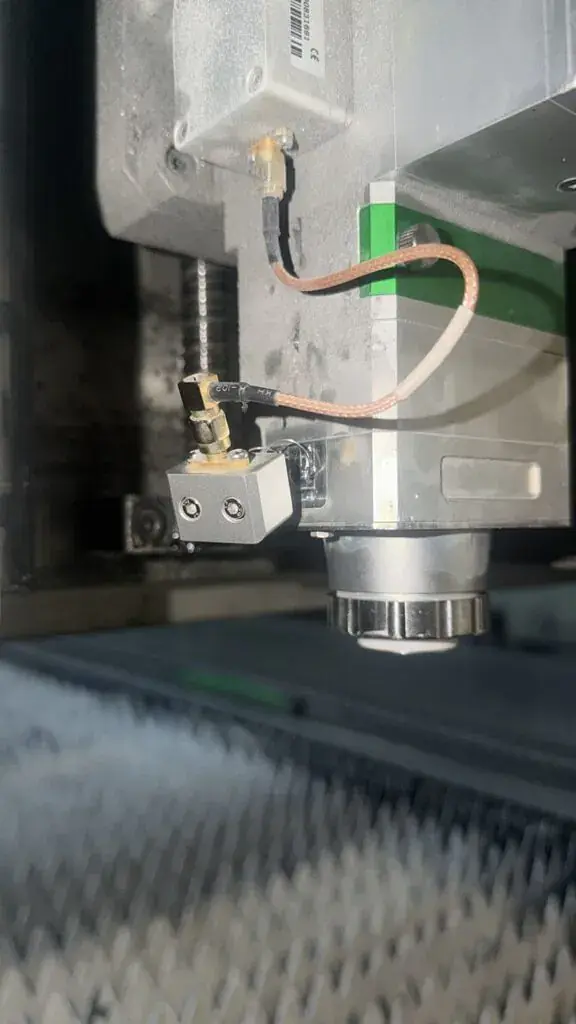




Modern fiber lasers operate at incredibly high speeds. If a cut part tips up on the slat table, the laser head can strike it, causing severe damage. Here is how to prevent it:
Utilize Micro-Joints: When cutting thin materials or complex geometries, leave small micro-
joints (tabs) to keep the part anchored to the main sheet until the entire nest is complete.
Optimize Your Cutting Path in Bochu: Use your Bochu control software to set proper
cutting sequences. Configure the software to cut inner holes first, followed by the outer
contours, minimizing the risk of the head traveling over already-cut, tipped-up parts.
Enable “Frog Jump” and Obstacle Avoidance: Ensure that the lift height (Z-axis
retraction) between cuts is high enough to clear any potential tipping parts. Bochu’s obstacle
avoidance features and capacitive sensing should be actively calibrated.
Regular Capacitive Sensor Calibration: The height controller relies on the capacitive
sensor to maintain a consistent standoff distance. Calibrate this sensor daily and whenever
changing nozzles.
Anatomy of a Collision: What Gets Damaged?
When a collision occurs, the impact forces are transferred up through the cutting head. The
most common components damaged include:
•
The Capacitor / Ceramic Ring: This is designed to break first, acting as a mechanical fuse
to protect the expensive optics inside the laser head.
•
•
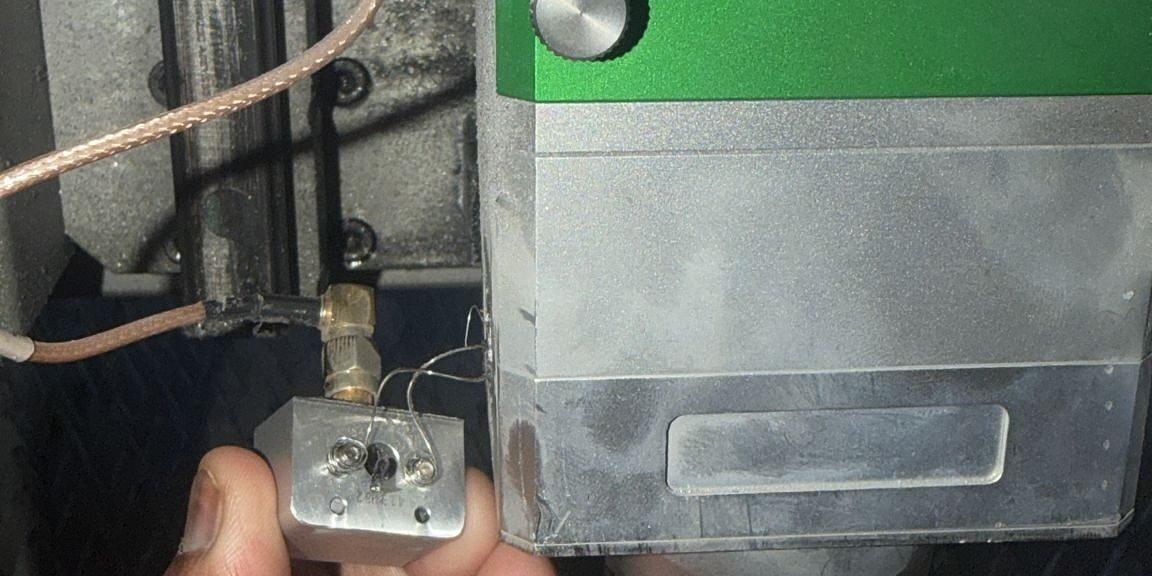
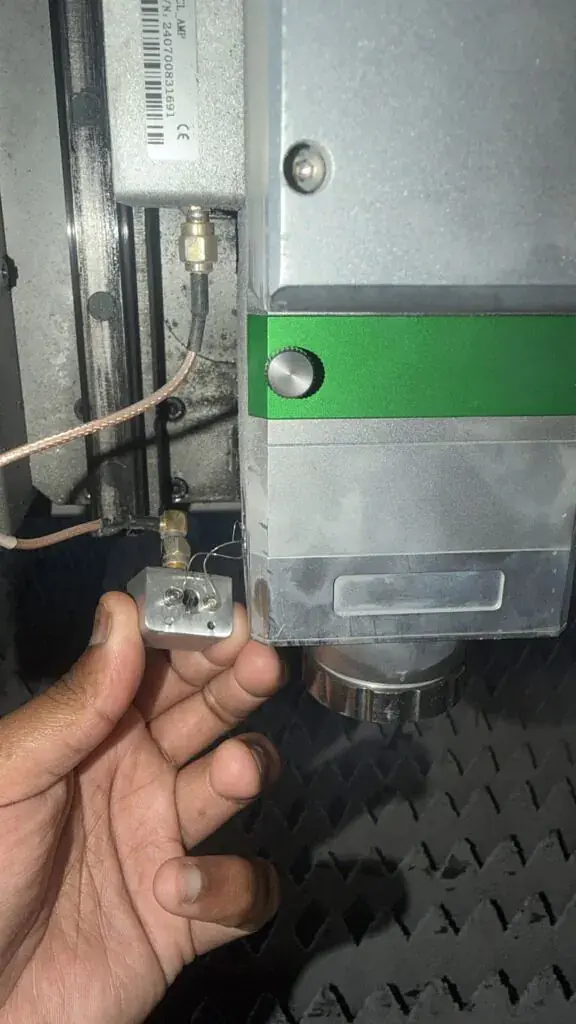
Height Control Connection (RF/SMA Cables): The delicate wiring that sends the
capacitance signal from the nozzle to the height controller block can be severed or bent.
Servo Motor and Z-Axis Mechanics: In a severe crash, the Z-axis servo motor may
overload, or the linear guides and ball screws might be misaligned or damaged.
Requesting Service and Pricing from Moon Machinery
if a collision happens, swift action is required to get your machine back in production. To
provide accurate pricing and the correct replacement parts, our service technicians need
specific visual and technical information from your machine.
What to Provide to the Moon Machinery Technician:
Please email or WhatsApp our service department with clear photos of the damage and
your machine’s identification plates. Refer to these specific examples of what we need:
•
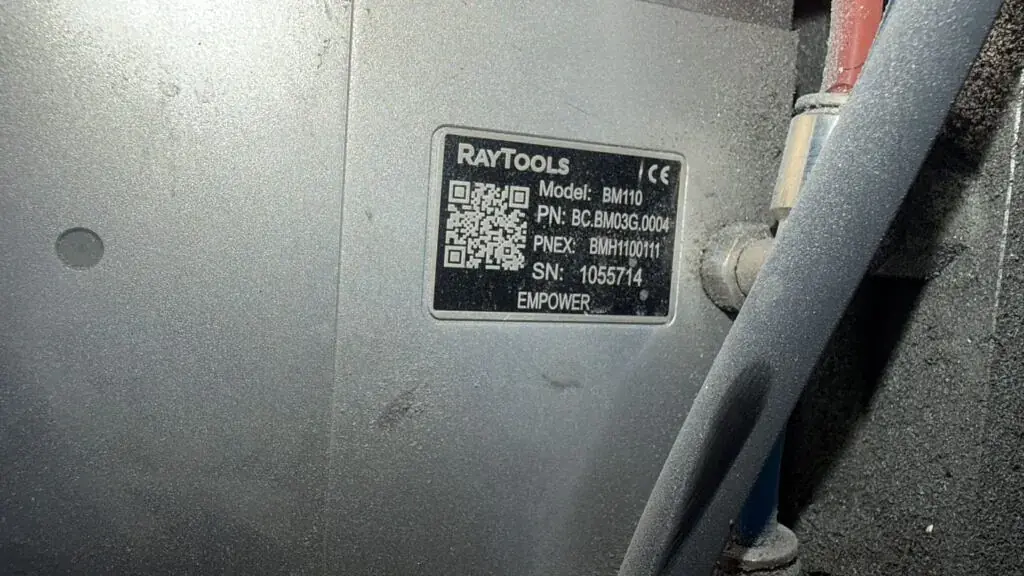
Laser Head Model Plate: We need to know the exact build of your head. Please
provide a clear photo of the silver Raytools specification plate, exactly like the one seen
in WhatsApp Image 2026-08-31 at 19.41.50 (3).jpg . This ensures we match the
exact PN (e.g., BM110) and SN for your system.
•
Broken Connections & Capacitor Block: Take close-up photos of the severed height
control connections and the sensor block. Excellent examples of the angles we need
are shown in WhatsApp Image 2026-08-31 at 19.41.50 (2).jpg and WhatsApp
Image 2026-08-31 at 19.41.50.jpeg . These images show our technicians exactly
where the coaxial pin and brass fittings have failed.
•
Required Sensor Assembly: Depending on the damage shown in your photos, we
may need to supply a completely new sensor block. You can reference raytool
sensor assembly for laser head.jpg when speaking with our parts department to
confirm if you need the entire 78mm x 60mm assembly block, the SMA connector, or
just the internal ceramic components.
Additional Information Needed:
•
Does the Z-axis servo motor still jog up and down smoothly via the Bochu software, or
is it throwing an alarm?
•
Is there a “Capacitance 0” or “Z-axis following error” alarm on the screen?
By providing these exact details and referencing the correct imagery, Moon Machinery can
instantly dispatch the right replacement parts from our local Ontario facility, minimizing your
downtime.